Microsoft Copilot up close: a permissions project dressed up as AI
Copilot in 2026: four products, per-seat pricing, what works in a Microsoft shop, where it leaks, and a rollout checklist for 50 people.
On March 2, 2026, someone at Windows Latest posted one word to the official Copilot Discord server: Microslop. The message never appeared in the channel. Only the sender saw a moderation notice saying the word broke the server rules. Within hours people were typing Microsl0p, with a zero instead of the o. The filter missed it, and Microsoft locked the server.
That’s the brand side. If you’re a 50-person company that lives on Outlook, Teams and SharePoint, the questions are different: what you pay for, what it can see, and what it can do on your behalf. In the previous part we saw that Gemini is already included in most Workspace plans. Microsoft works the other way around: the chat is included, and the real product costs $21 to $30 per user per month.
One more number before we start. In a March 31 post, Tey Bannerman tries to count how many Microsoft products are called Copilot. The count started at 75 or more, and by April 5 it had reached 80. That includes a keyboard key and a whole category of laptops.
Four Copilots that matter to an office, and what Copilot isn’t
Out of the 80, four matter to a typical Israeli office:
- Consumer Copilot. The Windows app and copilot.microsoft.com, signed in with a personal Microsoft account. Its terms of use say explicitly that they don’t apply to anyone signed in with a work (Entra) account. It’s a tool for home, not the office.
- Microsoft 365 Copilot Chat. Chat with web search and Enterprise Data Protection, free for anyone with an M365 license. It sees the files you upload to it, not the whole tenant.
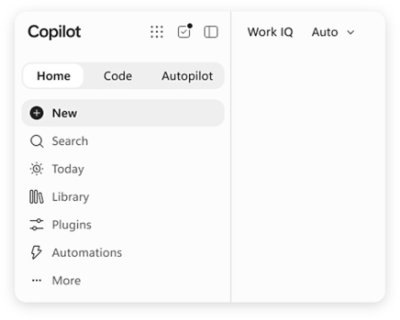
- Microsoft 365 Copilot. The paid add-on. It sits inside Word, Excel, PowerPoint, Outlook and Teams and grounds its answers in your email, meetings and files through Microsoft Graph. Microsoft now calls this layer Work IQ. It includes Agent Builder, and if you need serious agents there’s Copilot Studio.
- GitHub Copilot. A different product, different billing, different admin (the GitHub org). It has agent mode in VS Code and a coding agent that takes an issue and opens a PR.
What it isn’t: it isn’t a model. Copilot is a harness around models from OpenAI and Anthropic, and Auto mode picks between them on each request. It also isn’t one product with one console. The M365 admin center, the Power Platform admin center and GitHub are three separate places for settings, permissions and invoices. Whoever runs IT at a 50-person company should know that before promising the CEO a single point of control.
What happens when you turn it on
The strongest part is Teams. After a transcribed meeting you ask what was decided and who owns what, and you get a list with names and links to the right spot in the recording. If you sit in six meetings a day, you’ll feel the difference in the first week.
In Outlook: a summary of a 40-message thread, a draft reply, and inbox triage. In Word: a new document built from files you tag with /. Excel works best when the data is formatted as a Table; otherwise it gets confused. PowerPoint can build a deck from a Word document, but it looks like a template and needs more work.
The Copilot app has Auto. According to Microsoft, Auto weighs accuracy, speed and cost on each request and picks a model and an effort level. In Agent Builder you describe an agent in plain language, point it at a SharePoint folder, and a few minutes later you have a bot that answers questions about HR policy. Then there’s Cowork: an agent that runs multi-step tasks with your permissions through Graph, available in Microsoft’s early access program. More on that shortly.

The numbers: what costs what
| Product | List price | What you get | Who manages it |
|---|---|---|---|
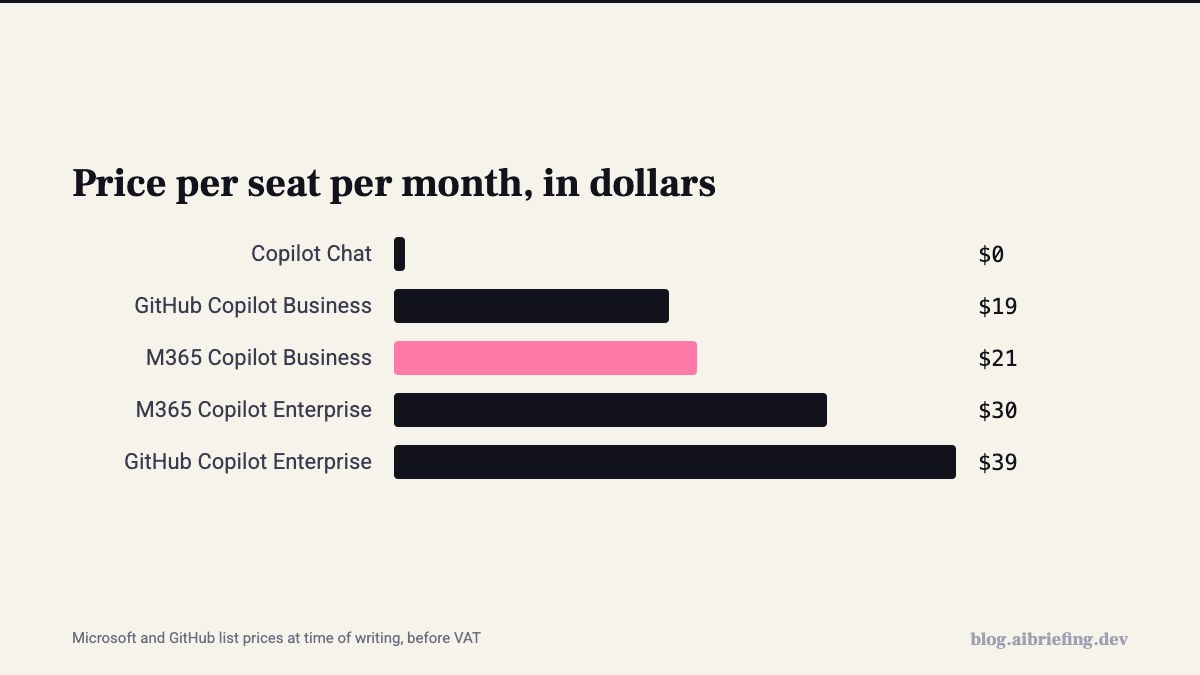
| Copilot Chat | $0 with an M365 license | Chat, web search, EDP, file upload | M365 admin |
| M365 Copilot Business | $21 per user per month, up to 300 seats | Copilot in every app, Graph, Agent Builder | M365 admin |
| M365 Copilot (Enterprise) | $30 per user per month, annual | Same thing, for large organizations | M365 admin |
| Copilot Studio | $200/month for 25,000 credits, or pay-as-you-go | Agents with connectors and autonomous actions | Power Platform admin |
| GitHub Copilot Business / Enterprise | $19 / $39 per user | Agent mode, coding agent, premium request quota | GitHub org owner |
These are list prices in dollars, before VAT, at the time of writing. Through an Israeli CSP the price may differ, so check the Plans & pricing page. All the add-ons need a base license: Business Standard, Business Premium or E3/E5.
Now the math for 50 people. Everyone on Business: 50 × $21 = $1,050 a month, $12,600 a year. A 15-seat pilot: $315 a month. Ten developers on GitHub Business: another $190. On GitHub, premium requests over the quota cost $0.04 each, and agent mode burns through them fast. In Copilot Studio a single message can cost several credits, depending on how many connectors the agent calls.
Where it’s actually strong
First, everything is already in place. Copilot sits in the same tenant, with the same users and the same permissions. No new vendor to vet, no new DPA to sign, no new SSO to configure. Every Copilot interaction is logged in the Purview audit log, and Purview DLP can stop Copilot from processing files with a given label. With EDP, your prompts aren’t used to train models.
Beyond that, search. “Where’s the proposal we sent customer X in February” works well, as long as your SharePoint permissions are in order. And meetings, as we said.
On the GitHub side, the coding agent takes an issue, works in an Actions sandbox and opens a draft PR. Combined with branch protection and required review, it’s a reasonable tool for small bugs and maintenance. Just remember it consumes both Actions minutes and premium requests.
Where it falls down
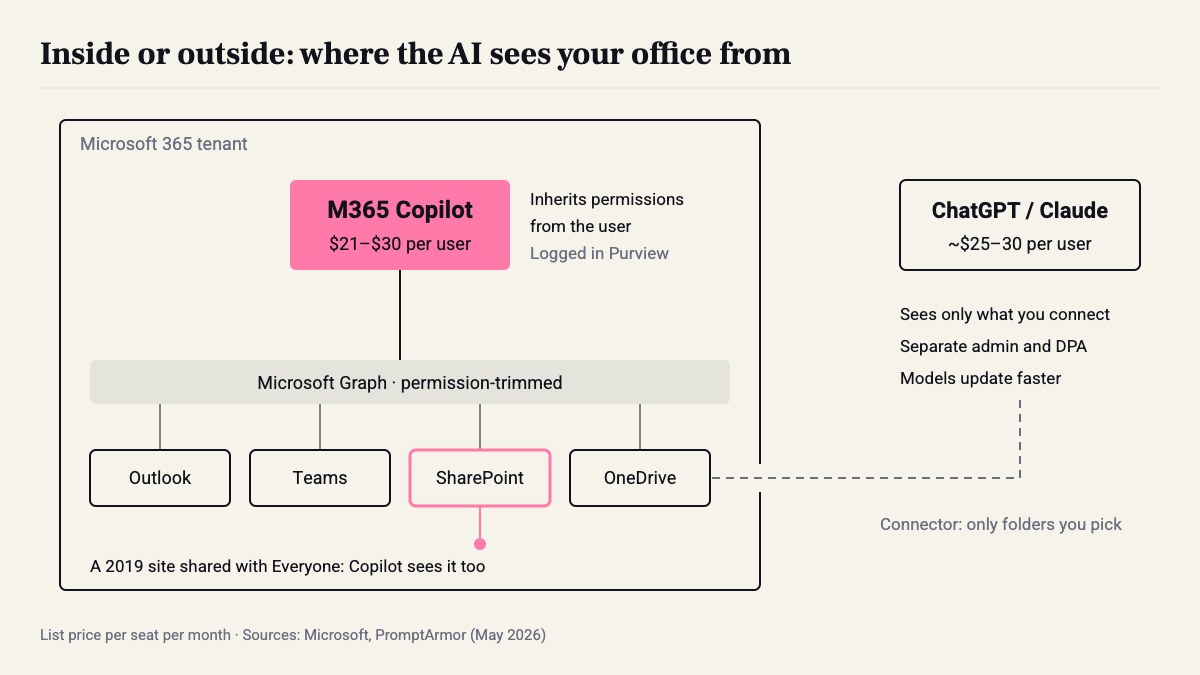
The first problem is boring and the most common: oversharing. Copilot sees everything the user sees. A SharePoint site shared in 2019 with Everyone except external users, with a payroll spreadsheet inside, will suddenly show up in answers. Copilot didn’t create the problem. It just turned it into one anyone can find with a search.
The second problem is more serious. On May 7, 2026, PromptArmor published an attack on Cowork: a poisoned skill with indirect prompt injection makes the agent exfiltrate files from the tenant. Here’s how Microsoft’s documentation describes the approval mechanism:
[Copilot] Cowork asks for your permission before taking sensitive actions, like sending an email or posting a message in Teams. — from the Cowork documentation on Microsoft Learn
In practice, when the recipient is the user themselves, the email or Teams message goes out with no approval at all, and no setting changes that. The agent generates a pre-authenticated download link to a file, embeds it in an external image URL, and emails it to you. You open the email, Outlook loads the image, and the link lands on the attacker’s server. According to PromptArmor, the attack succeeded in most attempts, even against Claude Opus 4.7.
This isn’t a one-off. In a talk at DEF CON Singapore, Johann Rehberger (Embrace The Red) showed a series of vulnerabilities in M365 Copilot and consumer Copilot, assigned CVE-2026-24299: data exfiltration through HTML preview using CSS background images and @font-face, plus adding and deleting memories through prompt injection. All of it is patched, but the pattern is clear.
On the consumer side: in March 2026 the Copilot app for Windows, in Insider builds from 146.0.3856.39, started opening links in an Edge-based side pane instead of the default browser. And Copilot Health, launched the same month, centralizes medical records without being HIPAA compliant. On managed machines, decide whether the consumer app should be there at all.
My take: I don’t see Cowork as a bug. I see it as the price of an agent with full permissions inside a system where every email is an exit channel. Until Microsoft lets you control the approval step, I wouldn’t turn it on in a tenant with financial data.
Versus ChatGPT or Claude with a SharePoint connector
The obvious alternative for a Microsoft shop is ChatGPT Business or Claude Team, around $25–30 per user, with connectors to SharePoint and Outlook. The difference isn’t the model. Microsoft already runs Anthropic models inside Copilot. The difference is where the AI sits.
Copilot sits inside the tenant, inherits permissions and is managed from the same console. The competitors sit outside and only see what you connect. That’s less context, but also fewer surprises, and their models update faster. Bottom line: for an office that lives on Outlook and Teams, Copilot is the default for office work. Anyone doing heavy analysis or code probably needs another tool too.
Who needs it this quarter, and a 50-person checklist
If you’re on Business Premium or E3 and your people live in meetings and email, run a pilot. If your SharePoint is a mess, not yet. Fix permissions first. And if most of the team are developers, the real decision is GitHub Copilot versus tools like Claude Code, not M365.
The checklist:
- Permissions, week 1. In the SharePoint admin center: Reports → Data access governance. Run the sharing links reports and the Everyone except external users report. Any finance or HR site shared with everyone gets locked down immediately, and sensitive sites get Restricted Content Discovery.
- Purview. A Confidential label on finance and HR folders, and a DLP policy on the Microsoft 365 Copilot location that blocks processing those files.
- Copilot Chat for everyone, $0. Make sure everyone signs in with an Entra account and sees the Protected badge. Tell the team explicitly: work doesn’t go through the consumer app on a personal account.
- 15 Business seats for 30 days. Sales, management, PMs: whoever has the most meetings and email. Turn on Teams transcription; without it, half the value disappears.
- Measure. In the M365 admin center: Reports → Usage → Microsoft 365 Copilot. After 30 days, anyone using it fewer than three days a week hands the license to someone else.
- Agents. Agent Builder is open to everyone. Copilot Studio for two people only, in a separate Power Platform environment with DLP that blocks the HTTP connector and external connectors, and with a pay-as-you-go cap.
- Agentic. Don’t turn on Cowork for now. In Outlook, disable automatic download of external images; that closes the exit channel PromptArmor used.
- GitHub. Business for developers. Set Suggestions matching public code to Blocked, add content exclusions for folders with secrets, set an explicit budget for premium requests, and run the coding agent only on repos with branch protection and required review.
The math: 15 × $21 + 10 × $19 = $505 a month, instead of $1,050 for everyone with your eyes closed. And that’s the easy part. Copilot will expose every folder you shared with Everyone in 2019. Better to find out from a report than from a chat answer.
Sources
- Microsoft Copilot: AI built for work
- “Microslop” filtered in the official Microsoft Copilot Discord server · 2026-03-02
- How many products does Microsoft have named 'Copilot'? · 2026-04-04
- Microsoft: Copilot is for entertainment purposes only · 2026-03-31
- Microsoft Copilot Cowork Exfiltrates Files · 2026-05-25
- Microsoft Copilot Update Hijacks Default Browser Links · 2026-03-10
- Microsoft Copilot Health Centralizes Personal Medical Records · 2026-03-13
- Copirate 365: Plundering in the Depths of Microsoft Copilot (CVE-2026-24299) · 2026-07-29
- How Do AI Agents Work? AI Explained | Microsoft Copilot
How this was made: drafted by our agent from 9 sources, edited and approved by Koby Almog.