OpenAI dots up close: the agent that never goes home
OpenAI dots up close: an agent on its own cloud computer, running 24/7 across 4,000 apps. What it does alone, what it costs, and what not to give it.
4,000. That’s how many apps a dot can connect to on day one, according to OpenAI’s launch post from September 29, 2026. Each one is another place where an agent can read, write and send. And unlike a regular ChatGPT thread, a dot keeps working after you close the window.
Sam Altman showed it at DevDay, in front of about 2,500 developers on the pier at Fort Mason in San Francisco. We went through the launch post, DataCamp’s walk-through and the coverage from the event. This post is the result: what it is, what it costs, where it’s strong, where it falls short, and how it compares to OpenClaw and Claude Code. At the end there are three tasks we’d give a dot this week, and two we wouldn’t.
What dot is, and what it isn’t
In short: a dot is a persistent agent inside ChatGPT, running on GPT-6 Astra, OpenAI’s flagship model. It has its own cloud computer, its own browser, and access to the apps you connected through plugins. You talk to it in ChatGPT, Slack or Teams, and you can also jump on a voice call with it. It learns from feedback and handles several projects in parallel without you managing separate threads for it. According to DataCamp, OpenAI’s help docs describe the difference from a regular chat in one sentence: a dot keeps working when the conversation stops.
Dots can do nearly anything using their own cloud computer, their own browser, and the apps you’ve connected.
— OpenAI, Introducing dots
The words that matter there are “the apps you’ve connected.” The “nearly anything” is exactly as big as the permissions you gave it. No more, and no less.
What it isn’t:
- It’s not an API. You don’t pick a model, you don’t see the harness and you don’t write the loop. DataCamp calls it a managed alternative, and that’s accurate.
- It’s not a coding agent inside your repo. OpenAI says that internally, dots turn designs into working apps. But it works on its own computer, not against your tests.
- It’s not a team yet. Today you start with one main dot. Teams of dots are a vision, and specialist dots for enterprises are in preview.
What happens when you turn one on
A quick caveat: we don’t have access yet, so what follows is pieced together from the launch post, DataCamp and the on-stage demo. The actual flow:
- Setup is desktop-only. Not from your phone.
- You name your main dot. Holly Li from OpenAI’s product team calls hers Dottie.
- You connect apps. From then on it can explore and build memories from what’s there, even without a new message from you.
- You write Custom Rules. They decide what it does on its own and what it brings back to you. On top of them sit safety checks you can’t turn off.
- You work with it. From ChatGPT, Slack or Teams. At any point you can open its computer and watch what it’s doing.
- Optional: laptop access. If you approve, it also connects to your machine and works alongside you.
The best example in the launch post is a small one. One early tester’s dot noticed he’d forgotten to invoice a newspaper, prepared the invoice, and sent it only after approval. Look at the order: noticed, prepared, waited, sent. That’s the pattern worth copying.
Here’s how we’d write Custom Rules for the first week. Copy and adapt:
On your own, without asking:- Read connected channels and folders, summarize, search the web- Prepare drafts (email, invoice, document) and save them as drafts
Only after my approval:- Anything sent outside: email, channel message, reply to a customer- Any action that costs money or changes a record (CRM, accounting, Jira)
Never:- Delete files, messages or records- Connect to my laptop unless I asked that same day- Act in groups that include people outside the organization
Every day at 18:00: a list of what you did on your own today, with links
The numbers
- Announced: September 29, 2026, at DevDay.
- Model: GPT-6 Astra. No option to pick another.
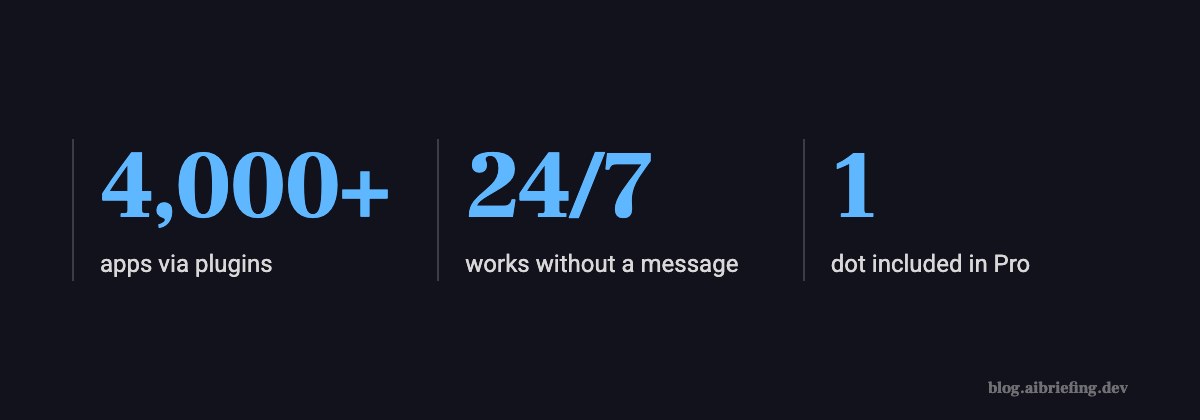
- Integrations: more than 4,000 apps through plugins, including Slack and Google Drive.
- Who gets it: Pro, Business Premium and Enterprise, in eligible markets. The first dot is included at no extra cost in Pro and Business Premium.
- Where not: at launch, Pro isn’t available in the EEA, Switzerland or the UK. Israel isn’t on the exclusion list, but check your own account.
- Setup: desktop only.
Pricing itself moved at the same time. According to mixed-news, a new $500 tier showed up alongside the launch, and the $200 Pro plan got a lower allowance.
The background is worth remembering. DataCamp describes weeks of price war: GPT-6 Sol and Luna shipped as cheap workhorses, and Anthropic cut Opus 5.5’s price by 20% while keeping Sonnet 5.5 at $2 input, $10 output. With dots, OpenAI isn’t selling tokens. It’s selling a subscription to its expensive model, and shifting the question from “what does a million tokens cost” to “how much work does this close for me per month.” From their side, that’s pretty smart.
Caveat: We couldn’t open the mixed-news article (Cloudflare blocked it), so the $500 and $200 figures come from the headline only. Before you upgrade, check OpenAI’s pricing page for the actual allowance, and above all whether a dot’s background work counts against it.
Where it’s strong
Initiative. This is the real difference from every chatbot. OpenAI describes a bug showing up in Slack and the dots already starting to investigate, and during planning they make sure everyone is up to date ahead of the deadline. Nobody asked. That’s exactly what DataCamp calls “the work you never got around to automating.”
Continuity. Same context across Slack, Teams and ChatGPT. Holly Li said on stage that people at OpenAI started treating dots like representatives, and now add them to group chats from the start.
No infrastructure. No server, no API keys to rotate, no machine that falls asleep in the middle of the night. Anyone who has run an agent on a laptop knows the morning you find out it got stuck at 2 a.m.
Enterprises. The specialist dots in preview get their own identity for access management, hardware from IT, and deep connections to systems of record. That’s the part the CISO will want to see before the personal dot, because at least you know who did what.
Where it falls short
The demo. In the keynote, Romain Huet tried to show voice control, and the main screen read “Voice chat couldn’t start.” Later, Holly Li’s dot didn’t respond to a live request, and she joked that “Dottie is having kind of a slow morning.” On launch day, you forgive that. But an agent that’s supposed to work 24/7 is judged precisely on its slow mornings.
Background memory is also exposure. A dot builds memories from the apps you connected without any message from you. Connected a shared Drive? It also reads what you forgot was in there. Your least privilege runs through the plugins: what you didn’t connect, it can’t see.
Black box. No evals of your own, no logs in your structure, no model choice. The only inspection tool is opening its computer and looking. Nice for transparency, but it doesn’t hold up once you have ten dots.
Europe is out. Pro didn’t launch in the EEA, Switzerland or the UK. Nobody said why, but with an agent that reads email and builds memories on its own, it’s hard not to guess regulation.
dot vs OpenClaw vs Claude Code
| dot | OpenClaw and similar | Claude Code | |
|---|---|---|---|
| Where it runs | OpenAI’s cloud computer | Your machine or a VPS | Your terminal, inside the repo |
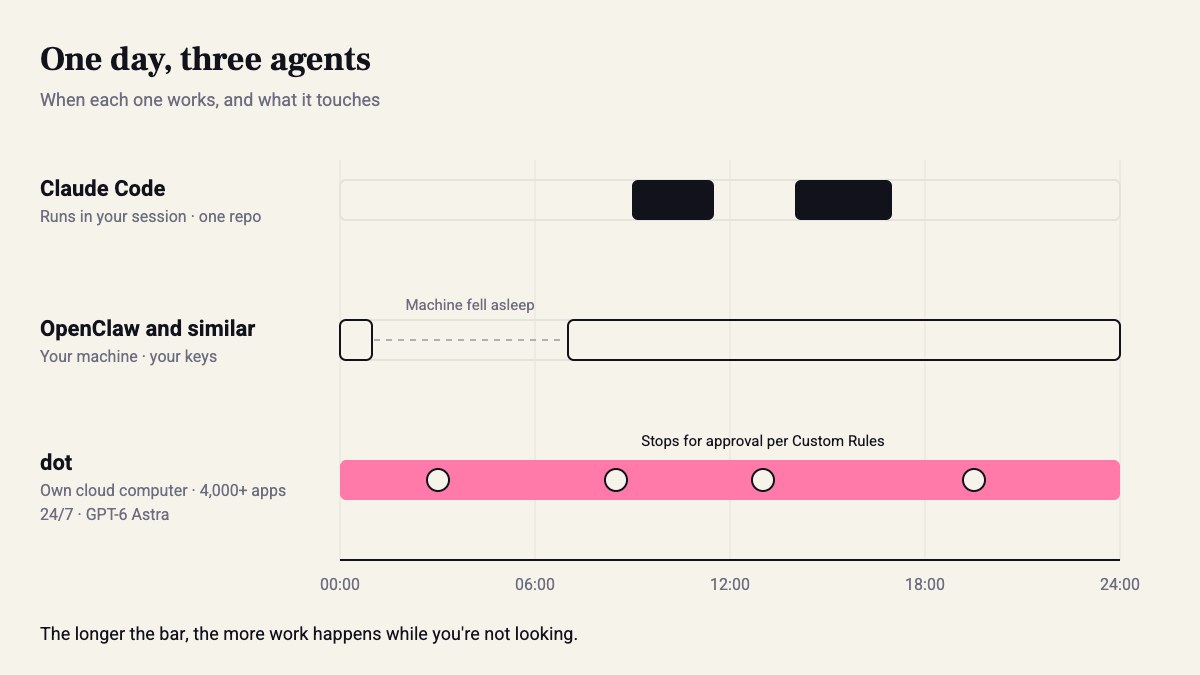
| When it works | 24/7, even without a message | As long as the machine is on | In a session, or headless with claude -p |
| Model | GPT-6 Astra, no choice | Whatever you plug in | Claude: Sonnet or Opus |
| Who holds the keys | OpenAI and the plugins | You | You |
| How you check it | Open its computer, Custom Rules | Your logs | diff, tests, git |
| Strong at | Work nobody got around to automating | Full control of the stack | Code with a verification loop |
In short, three different answers to the question of where the agent lives. OpenClaw- and Instinct-style agents give you the whole stack, and all the pain: you own the machine, the keys and the uptime. Claude Code lives inside the repo, and there it has something a dot doesn’t get: tests, diff and git that check it. A dot is the only one that works when you’re not around, on infrastructure that isn’t yours.
That said, it’s not really either/or. Our guess is that in dev teams Claude Code stays on the code, and dots take what’s around it: tickets, email, status. We’ll get to Gemini and Copilot in the next parts of the series.
Three tasks for a dot this week, and two to keep away
Give it:
- Triage for your Slack bug channel. This is the example OpenAI itself leads with. Let it read, reproduce in its browser and write a summary in the thread, without opening tickets on its own. After 10 bugs, count how many summaries were correct. Below 7, tighten the rules.
- Money that falls through the cracks. Invoices that never went out, follow-ups that never got sent. It drafts, you approve. Exactly the invoice case from the launch post.
- Status before a deadline. Every morning at 08:30 it goes through Jira or Linear and Slack, and sends you, only you, what’s stuck and who’s waiting on whom. If a full week of that is accurate, open the team channel to it.
Don’t give it:
- Any access to production or a cloud console. In July 2025, Replit’s agent deleted Jason Lemkin’s production DB, in the middle of a code freeze and despite an explicit instruction. And that was an agent in a session, with a person sitting there watching it. A dot works while you sleep.
- Sending anything outside in your name without approval. Emails to customers, messages in groups with outside people. Drafts yes, sending only after you click. OpenAI’s safety checks don’t know your most sensitive customer. Your Custom Rules do, if you wrote them.
Sources
How this was made: drafted by our agent from 6 sources, edited and approved by Koby Almog.