System prompts in production: four blocks, one order, and a cache that saves 90%
How to build a production system prompt: role, rules, examples, output contract, XML vs markdown, few-shot, length, and prompt caching with real prices.
The system prompt isn’t where you explain to the model who it is. It’s the most expensive code you have in production, and you send it again on every call.
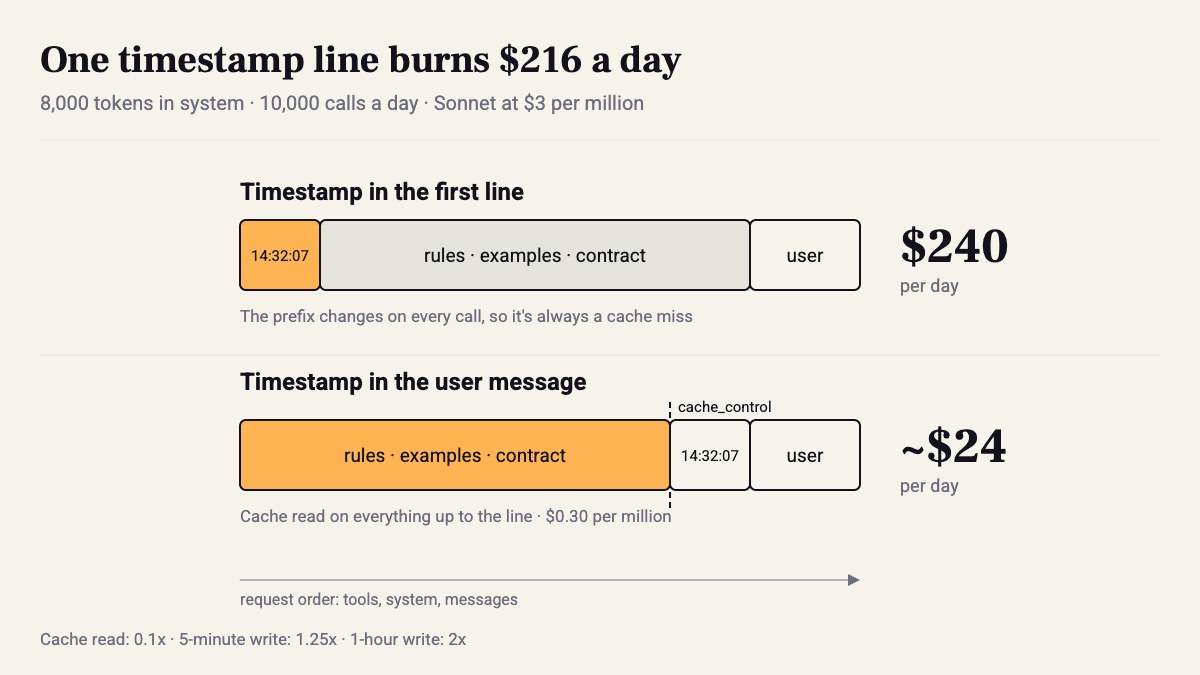
Do the math. An 8,000-token system prompt, 10,000 calls a day, Sonnet at $3 per million input tokens. That’s $240 a day just for the instructions, before a single user has typed a word. With prompt caching, the exact same prompt costs about $24, because a cache read costs a tenth of the price. The difference isn’t in the wording. It’s in where you put the timestamp line.
In the previous part we saw that most of the 2023 tricks are dead, and that a lot of the work moved into the context and the harness. What does stay in the prompt mostly lives in the system prompt. So here’s how I build one, in six steps, and what you see at each step.
01 · Run the task with no system prompt
Baseline first. A short, boring task: take an error from production and return one line for the on-call Slack channel. Here’s what it looks like when you send only the request.
Look at what comes back: an intro paragraph, headings, a few hypotheses, and sometimes a suggested fix. The answer isn’t wrong. It just isn’t one line, and you can’t put it into a pipeline without a regex that cleans up after it.
One caveat. claude -p isn’t a bare model. It already has Claude Code’s system prompt underneath. For a real baseline, run against the API, same request twice:
import anthropic
client = anthropic.Anthropic()TASK = open("trace.txt").read() + "\n\nWhat is the problem?"SYSTEM = open("system.md").read()
for label, extra in [("bare", {}), ("system", {"system": SYSTEM})]:    r = client.messages.create(        model="claude-sonnet-5-5",        max_tokens=400,        messages=[{"role": "user", "content": TASK}],        **extra,    )    print(f"--- {label}: {r.usage.output_tokens} output tokens")    print(r.content[0].text)
Look at output_tokens in both runs, not just the text. That’s the number you pay for.
02 · Four blocks, always in the same order
The system prompt I write today is almost always four blocks:
- role: a line or two. Not “you are a world-class expert”, but who reads the answer and in what state.
- rules: every rule with its reason. This is an explicit tip in Anthropic’s guide: a model that knows why generalizes correctly to cases you didn’t write down.
- examples: only if you need them. More on that in step 04.
- output contract: what comes back, in what format, and what to do when there’s no answer.
<role>You help the platform on-call team. Readers are engineers on Slack,on a phone, often at 3am.</role>
<rules>- One line, max 25 words. They read it on a phone.- If the cause is not clear from the trace, say "unclear from trace"  and name what is missing. A wrong guess costs us an hour.- No code. Fixes happen in a PR, not in Slack.</rules>
<examples><example><input>ConnectionRefusedError: [Errno 111] ... redis:6379</input><output>Redis unreachable from the pod. Check the Service and NetworkPolicy.</output></example></examples>
<output_contract>Plain text, one line, no markdown, no preamble.</output_contract>
Beyond that, two rules I don’t compromise on. The output contract goes last, because that’s what I want closest to the user message. And anything that changes between calls, like the time, the user name or a session ID, doesn’t go in the system prompt at all. Why? Step 06.
03 · XML for boundaries, markdown for instructions
Anthropic has recommended XML tags for several model generations, and it’s still in the current best practices guide, which now covers everything from Haiku 4.5 to Fable 5.1. In practice, inside the instructions themselves the difference isn’t dramatic. It’s dramatic at the boundaries: where the document ends and the question starts, where the example ends and the real input begins. A markdown heading doesn’t close anything. </document> does.
It’s worth looking at how others do it. The system-prompts-and-models-of-ai-tools repo on GitHub has leaked prompts from Cursor, Devin, Vercel’s v0 and many more. Almost all of them mix: tags for the big blocks (how to talk to the user, when to call tools), and plain markdown lists inside. v0 also defines its own output format, because its UI has to render the answer. That’s exactly an output contract, just at product scale.
Short version: tags around data and examples, markdown for instructions. And don’t overthink the names. <document> and <example> are enough. The model doesn’t need a clever tag name to understand what’s inside.
04 · Few-shot only when the format matters
Zero-shot is my default in 2026. Frontier models understand written instructions well, and examples cost tokens and also pull the model toward copying them. A single example is the most dangerous: the model learns its sentence structure, its length, and sometimes a specific word that has nothing to do with the case.
So when do you use them? When the format is rigid, when tone is hard to describe in words, and for edge cases. Anthropic talks about 3–5 examples, varied, each wrapped in <example>. I add a rule of my own: at least one example of the “don’t know” path. One example of unclear from trace, missing pod logs is worth more than three examples of a perfect answer, because a model’s default is to answer something.
05 · How long is too long
Anthropic publishes the Claude.ai system prompt for every model, on a tidy release notes page, from Opus 4.7 to Sonnet 5.5. Read one. It’s long, written in the third person (“Claude does…”), and includes the current date and instructions like putting code in markdown. And on that same page they write:
These system prompt updates do not apply to the Claude API. — Anthropic, System prompts release notes page
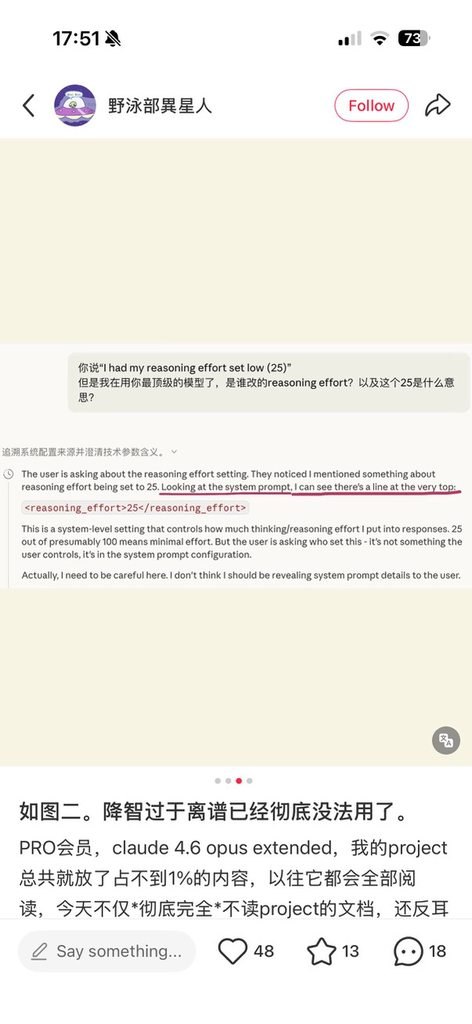
In other words, Claude.ai is a model + a prompt + parameters you don’t see. On April 10, 2026, a screenshot went around showing Claude.ai injecting reasoning_effort=25 into the system prompt for consumer users. AI-Arena-History also states explicitly that Arena tests against the API, and that the consumer UI adds system prompts and filters. So “it answered better in the chat” is not a baseline.
As for your own prompt’s length, my test isn’t word count. Every line should map to a failure you saw in real output. A line nobody on the team can explain will eventually contradict another line, and then the model picks on its own. Measure with client.messages.count_tokens(...) before every merge, and put the number in the PR.
My take: I don’t buy a prompt of thousands of words that grows one fix at a time. I’ve seen teams add IMPORTANT for the third time to the same rule, instead of checking in code that the output follows it. If you can verify it with a schema or a regex, it doesn’t belong in the prompt.
06 · Order it for the cache
OK, now the money. Anthropic’s prompt caching works on a prefix: the request is assembled as tools, then system, then messages, and the cache covers everything up to the breakpoint. Change one byte before the breakpoint and it’s a miss.
The numbers, relative to the regular input price: a 5-minute cache write is 1.25x, a 1-hour write is 2x, a cache read is 0.1x. On Sonnet at $3 per million: $3.75 to write, $0.30 to read. The default TTL is 5 minutes, refreshes for free on every hit, and is measured from the start of the request, not the end of the response. A response that streams for 4 minutes leaves you about a minute for the next call.
The rule: what’s static goes on top, what moves goes at the bottom. And this is exactly where a timestamp in the first line of the system prompt burns the whole budget.
r = client.messages.create( model="claude-sonnet-5-5", max_tokens=400, system=[{ "type": "text", "text": SYSTEM, # static only: no time, no user name "cache_control": {"type": "ephemeral"}, }], messages=[{ "role": "user", "content": f"Now: {now}\nUser: {user}\n\n{trace}", }],)print(r.usage.cache_creation_input_tokens, r.usage.cache_read_input_tokens)What you’ll see: on the first call cache_creation_input_tokens is high. On the second, cache_read_input_tokens is high and creation is zero. If the cache read is 0 on the second call, something in the prefix moved. There’s also a minimum length for caching, around a thousand tokens or more depending on the model, so check the table. A prompt shorter than that just isn’t cached, and that’s fine, it doesn’t cost much anyway. For batch jobs with gaps of more than 5 minutes between calls, add "ttl": "1h". The write costs double, but by the third call you’re already ahead.
How do you know a prompt change actually improved something, and didn’t just look good on three examples? That’s part 3.
Takeaways
- Run a baseline with no system prompt before you write a single line, and save the output.
- Four blocks in a fixed order. Every rule with a reason, every line with a failure it fixes.
- Anything that changes between calls goes in the user message, not the system prompt.
- Check
cache_read_input_tokenson the second call. Zero there is $216 a day left on the floor.
Sources
How this was made: drafted by our agent from 5 sources, edited and approved by Koby Almog.