Claude Code in Practice, Part 1: Short CLAUDE.md, Strict Permissions
The three CLAUDE.md files, auto memory, settings.json permissions, and the commands worth memorizing. Step by step, for a real team.
The best CLAUDE.md on your team is probably the shortest one. Not the one /init generated, and not the one everyone added a line to after a bad day.
That sounds backwards, but Anthropic sets a ceiling too. Claude Code’s auto memory loads into each session only up to 200 lines or 25KB, whichever comes first. Matt Pocock put out a video titled simply “Never Run claude /init”. And in February 2026 someone at techloom compressed their CLAUDE.md by 60–70%, then ran a benchmark and found the file helps less than the community assumes.
Meanwhile, the file is becoming a default. bun init creates a CLAUDE.md automatically when it detects the Claude CLI, and per the September changelog, Claude Code reads AGENTS.md if there’s no CLAUDE.md. So you’ll have one of these files either way. The only question is whether it works for you or against you.
This is part 1 of a series: setting up for a real team. Files, memory, permissions, commands. Hooks, skills, and MCP wait for part 2.
01 · Map the three levels before writing a line
Claude Code loads CLAUDE.md from three levels, and each one belongs to someone different:
./CLAUDE.mdat the repo root. The team’s. Goes into git and gets reviewed like any other file.~/.claude/CLAUDE.md. Yours, across every project on the machine. Personal habits go here: commit message style, which language to answer in.CLAUDE.local.mdat the project root. Yours, this project only. Add it to.gitignore.
Above that sits an organization (managed) layer that IT distributes and you can’t override. And a CLAUDE.md in a subdirectory loads when Claude works on files there, which pays off nicely in a monorepo.
If the repo already uses AGENTS.md (the standard from OpenAI, Google, Cursor and others, donated to the Linux Foundation in December 2025), don’t duplicate it. An import is enough:
@AGENTS.md
## Claude-specific- Use plan mode before any change that touches more than one package.
So how do you know what actually loaded? /memory inside the session lists every file that came in and opens them for editing. Run it once on a new hire’s machine. Often you’ll find a ~/.claude/CLAUDE.md from some old project nobody remembers.

02 · Run /init, then delete half
/init scans the repo and writes a draft. It’s not bad, it’s long. Every time I’ve run it I got something reasonable and bloated. Pocock is right in principle: every line there goes into context on every message, every day. But you don’t need to give up /init, you need to edit after it.
What to cut: the directory layout (Claude sees it on its own), the dependency list (there’s a package.json), three paragraphs about what the project does. What to keep: the exact commands and whatever can’t be guessed. You should end up with something like:
# payments-api
## Commands- Test one file: `pnpm vitest run path/to/file.test.ts`- Full check before commit: `pnpm lint && pnpm typecheck && pnpm test`- Local DB: `docker compose up -d db` (port 5433, not 5432)
## Not obvious from the code- Money is integer agorot. Never floats, never `toFixed`.- Migrations: add a new file. Never edit a merged migration.- `src/legacy/` is frozen. Read it, don't change it.
## When you are done- Run the full check. If it fails, fix the code, not the test.
Notice what’s missing. No “write clean code”, no “you are a senior engineer”. What Claude needs is the command that tells it whether it got it right. Boris Cherny from the Claude Code team estimates that giving Claude a way to check itself improves results 2–3x. The full check line is worth more than every style paragraph in the file.
03 · Filter: what goes in, what stays out
Anthropic’s docs give the simplest test: CLAUDE.md is for the things you’d otherwise explain over and over. And one more line worth pinning next to your screen:
The more specific and concise your instructions, the more consistently Claude follows them.
— Claude Code Docs, How Claude remembers your project
In practice, a line goes in if Claude can’t infer it from the code (port 5433, agorot), or if it fixes a mistake that keeps recurring. Not one that happened once.
Stays out: style rules the linter already enforces, secrets, and instructions that only apply to some of the files. Those last ones go in .claude/rules/, and they load only when Claude touches matching files:
---paths: - "src/api/**/*.ts"---- Every handler validates input with the zod schema next to it.- Errors go through `toProblemJson()`, never a raw throw.Alex Jacobs wrote a post in August called “I am morally opposed to updating my Claude.md”. It’s funny, but the point is serious. The file turns into an archive of grievances: every line written in a moment of frustration, with no expiry date, while the model improves every four months and the rules stay frozen on what it did wrong last spring.
My take: I agree with Jacobs’s diagnosis, not his conclusion. The fix isn’t to stop writing, it’s to write every line like code: with a reviewer, and a willingness to delete it. A rule nobody is willing to delete is a rule nobody has tested.

04 · Auto memory: let Claude write, then read after it
Beyond what you write, there’s auto memory: notes Claude writes to itself when you correct it. It’s per-repo, shared across worktrees, and loads into each session up to 200 lines or 25KB. Anything past that simply doesn’t get in.
Boris’s tip, ending a correction with “Update CLAUDE.md so you don’t repeat this”, works. Claude really is good at phrasing rules for itself. That said, don’t let it write straight into the team’s CLAUDE.md without anyone seeing. Let it write, and have it go through a PR like any other change. That way another human reads the line before it becomes law.
And once a month, a cleanup. This is the prompt we run, read-only, without touching files. What comes out is a list. What you do: delete, run the next task, and see whether anything breaks. It’s the cheapest eval there is.
05 · settings.json: what’s allowed without asking
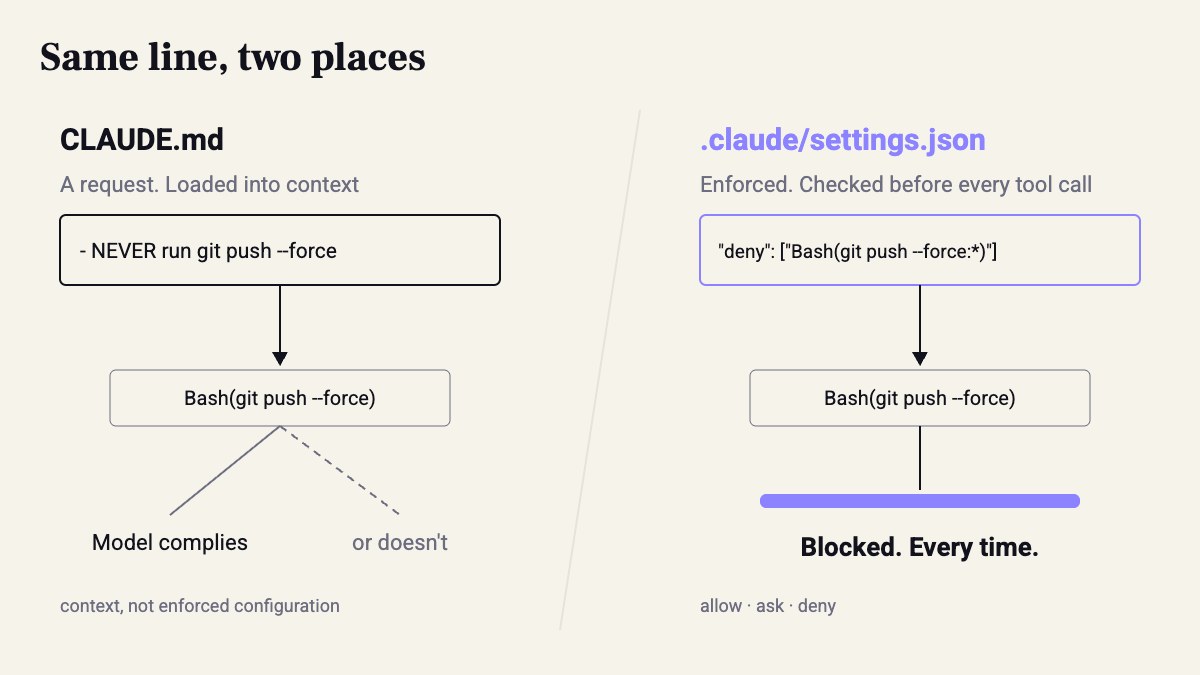
This is where we move from requests to enforcement. The docs say explicitly that Claude treats CLAUDE.md as context, not enforced configuration. A deny list in settings.json, on the other hand, is checked before every tool call. Four files, per the docs:
| File | Applies to | In git? |
|---|---|---|
~/.claude/settings.json |
You, in every project | No |
.claude/settings.json |
Everyone working on the project | Yes, commit it |
.claude/settings.local.json |
You, in this project | No |
managed-settings.json |
The whole org, no override | Distributed by IT |
Start with deny, not allow. First what must not be read, then commands with no undo:
{ "permissions": { "deny": [ "Read(./.env)", "Read(./.env.*)", "Read(./secrets/**)", "Bash(git push --force:*)", "Bash(git push -f:*)" ], "ask": ["Bash(git push:*)"], "allow": [ "Bash(pnpm test:*)", "Bash(pnpm lint)", "Bash(git diff:*)" ] }}Add allow entries after a week, based on what you approved by hand ten times. /permissions shows what’s active right now and which file it came from.
Got a line in CLAUDE.md that starts with NEVER? Move it here. Just remember deny matches on prefix, so git push origin +main still gets through. That’s what hooks are for, and we’ll get to them in part 2.
06 · Commands and shortcuts to keep at your fingertips
Shift+Tabtwice: plan mode, read-only. Any change touching more than one file starts here.Ctrl+G: opens the plan in your editor. The plan is text, edit it before it becomes code.@src/auth/login.pyinstead of “look at the auth module”. A precise reference saves searching and tokens.cat error.log | claudeinstead of pasting a stack trace into the window.Escstops mid-run. Better to stop at step two than fix things at step twenty.
And beyond those, a command of your own. Every markdown file in .claude/commands/ becomes a slash command for the whole team. The review everyone phrases differently? One file:
Review the diff against main (`git diff main...HEAD`).Check only: missing tests, money handled as floats, edits to merged migrations.Output a list: file:line, problem, suggested fix. No praise, no summary.Then /review, the same for everyone. When this should be a skill rather than a command is also part 2.
Takeaways
- CLAUDE.md goes through code review. A line without a reviewer doesn’t get in.
- Every NEVER moves to deny in
.claude/settings.json. A request stays a request. - The full check command is the most important line in the file.
- Once a month, delete a line and run. If nothing breaks, it didn’t need to be there.
Sources
- How Claude remembers your project - Claude Code Docs
- Settings files and precedence - Claude Code Docs
- Best practices for Claude Code - Claude Code Docs
- Claude Code now reads AGENTS.md if there is no Claude.md · 2026-09-18
- Claude Code as a Daily Driver: Claude.md, Skills, Subagents, Plugins, and MCPs · 2026-05-27
- I am morally opposed to updating my Claude.md · 2026-08-20
- Compress Your Claude.md: Cut 60-70% of System Prompt Bloat in Claude Code · 2026-02-24
- `bun init` automatically creates a Claude.md file by default · 2026-07-28
- AGENTS.md, SKILL.md, DESIGN.md: How AI Instructions Split into Three Layers | AWS Builder Center
How this was made: drafted by our agent from 9 sources, edited and approved by Koby Almog.