Grok Bot up close: a cloud computer that holds your passwords
SpaceXAI's Grok Bot: what it does on its own, what it costs when sources disagree, where it breaks, and the open-source alternative.
Grok Bot isn’t a model product. It’s a computer product, and Grok is the least interesting part of it.
SpaceXAI (formerly xAI) launched it in beta on August 11, 2026. On paper it’s another agent. In practice you’re buying a Linux machine in the cloud that stays on when you close your laptop. It holds your sessions for Gmail, Zendesk and Slack, and several named “bots” work on it in parallel. The model behind it (Grok 4.6, per the plans page) will be swapped for the next version. The machine, the permissions and the routines stay.
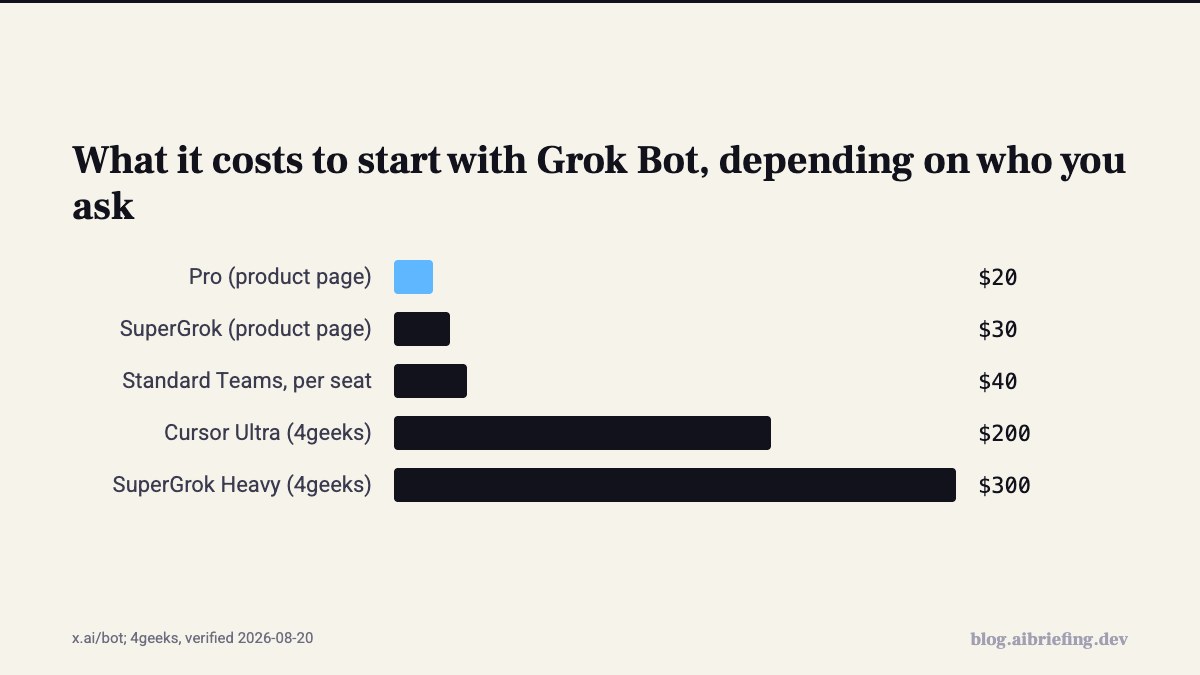
Want proof? Six weeks after launch, a developer at Runta built an open-source alternative called Errand in one week. His app is about 4,000 lines of TypeScript. He says so himself: he didn’t build the hard parts, because the runtime already existed. So the value sits in the infrastructure that runs the bot, not in the model that answers. And the entry price? Depends who you ask. The x.ai page says $20 a month. People who read the docs in launch week wrote $200 to $300. We’ll get to that.
What it is, and what it isn’t
There are four concepts, and they’re worth knowing before you start. A Bot is an agent with a name, a role, its own conversation and persistent context. The Cloud computer is one machine per account, with a browser, files and a terminal, and every bot shares it. A Skill is a set of instructions for a task: how to do it, how to check it, when to ask for approval. A Routine tells the bot when to run a task, on a schedule or after an event. That’s how SpaceXAI’s docs define them, and DataCamp work in the same order: test the skill first, schedule it after.
What it isn’t:
- It’s not the Grok chat app, and it’s not Grok Build, the coding CLI. It’s a separate product.
- You don’t download it from xAI. The installer lives on
downloads.cursor.com, signup goes throughcursor.com/bot/onboarding, and the docs say it outright: “Grok Bot uses Cursor authentication and account data settings”. Billing shows up in the Cursor dashboard too. - It’s not “a teammate that learns on its own.” Memory holds stable preferences and the role. DataCamp recommend putting anything that changes week to week in a file the bot reads, rather than trusting its memory.
Hands on: what happens when you give it a task
You install the desktop or iPhone app, create a Bot and message it like a colleague. The example on the product page is exactly that: “Sign in to Zendesk so I can work the support queue”. A window into its computer stays open on the side, showing a Working state. When it gets stuck on a form, you can step in and take control.
Two things here we didn’t see with Codex in the previous part. First, Teach a task: you do a workflow once, the bot watches and saves it as a routine that runs on its own. Second, you can put 2 to 6 bots in the same thread, and they hand work to each other without you approving every step.
What does it look like for real users? On September 6, Matthew Granda published BotOps, his method for running a fleet of bots. He talks to exactly one bot, a Chief of Staff. Under it sit bots that each own a domain (home, work, writing, Notion), and under those, one-off temps that browse a site or spin up a Cursor cloud agent. The source of truth is Notion, not the chat. And the default is silence: no findings, no ping. He put the skill in a public repo, github.com/granda/botops.
Claire Vo tested it on Lenny’s How I AI on August 24. What sold her was connectors for multiple accounts. She has four email addresses and seven Slack workspaces, and all of them connect to one bot. She says Codex and Claude aren’t there yet.
The numbers, and why they don’t add up
The sources flat out contradict each other here, so here’s all of them:
- Launch post (Aug 11): beta for SuperGrok, SuperGrok Plus and Heavy subscribers, for Cursor Pro, Pro+ and Ultra, and for Cursor Teams Standard and Premium. Desktop and iOS.
- 4geeks (checked Aug 11–12, re-verified Aug 20): not sold separately. Only bundled with Cursor Ultra at $200 a month, SuperGrok Heavy at $300, or Cursor Premium Teams at $120 per seat.
- Composio (Aug 20): early access for Heavy, Ultra and eligible team plans. macOS, Windows and iPhone. No Linux, Android or iPad.
- The product page today: Pro at $20 a month, SuperGrok at $30, Standard Teams at $40 per seat.
- Docs from September 2 (per 4geeks): macOS, Windows and Linux, iPhone on iOS 18+, Android 9+. Still no iPad.
The likely explanation: they started with the expensive plans and opened up the cheaper ones within a few weeks. What every source agrees on: the bot has its own usage quota, separate from your Grok or Cursor plan. Whatever you hand the bot doesn’t come out of your regular quota. An Enterprise version shipped on September 3, with two weeks free for Grok and Cursor Enterprise customers. Team Bots arrived on September 28.
And if you think in tokens: through the API, Grok 4.7 costs $2 input and $6 output per million tokens, with a 500k context. But that’s not the bot’s price. The bot is a subscription with “Weekly Grok Bot usage included”, not per-token billing. So you have no number to compare a nightly routine against.
Where it’s strong
It finishes the work inside the tool itself, and that’s really the whole story. Roman from the product team put it well in the launch post:
There is a huge difference between 90% done and 100% done. Most AI gets you almost there. Grok Bot can finish the swing, because the work lands where a human would put it, in the actual tool.
Most agents you know hand you back text, and you paste it into the CRM. Here the bot goes into the CRM itself, including systems with no clean API and no MCP. Their internal examples: a sales bot that updates the CRM from a call transcript and drafts a follow-up. An ops bot that assigns seats to new hires and processes invoices that land in Gmail. And an engineering bot that reproduced a UI bug, opened a ticket and handed it to a debugging bot.
On September 4 they said they gave the bot access to vendor spend, contracts and usage data, and it found more than $100,000 in direct savings. Those are their numbers, on their contracts. Nice, but you can’t verify it from the outside.
One more upside: simplicity. Claire describes a fast setup and built-in plugins that work from minute one. You don’t have to build a workflow before you start.
Where it falls down
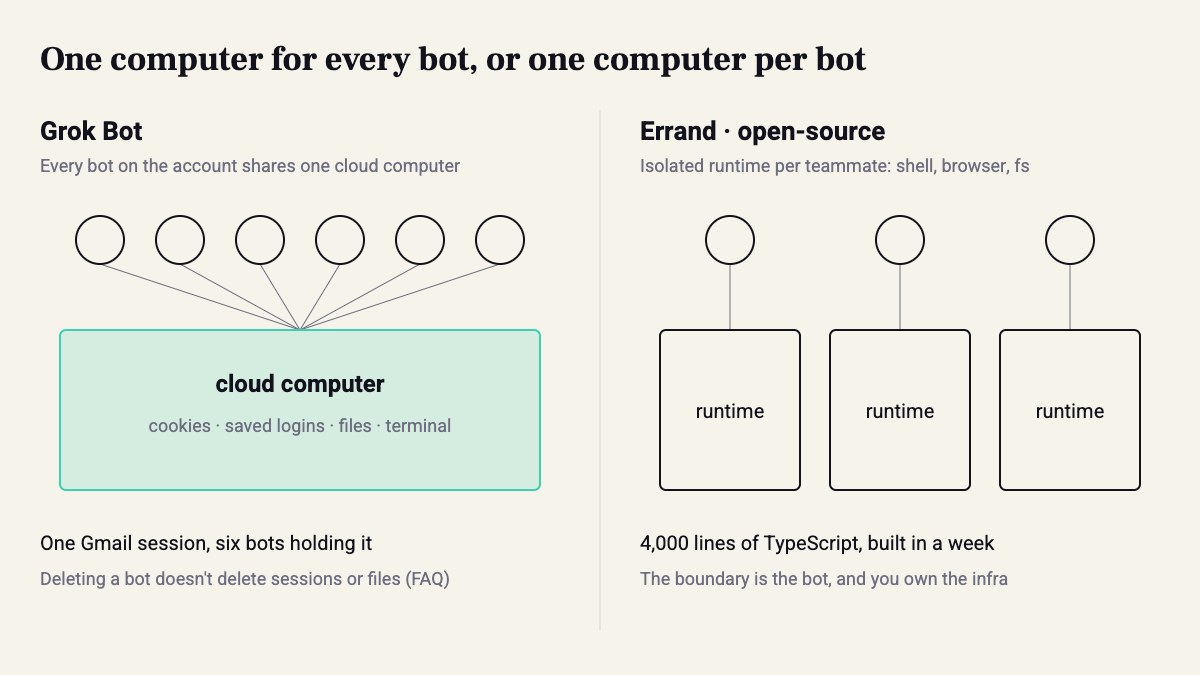
Back to the shared computer. Per the FAQ, the computer belongs to the account, not the bot. Every bot sees the cookies, the saved logins and the files. Signed into Gmail for the invoice bot? Now the bot that browses random websites holds that session too. And deleting a bot doesn’t guarantee its files or logins get deleted. Signing out and cleaning up is manual.
Computer use breaks where it always breaks: sites that block automation, CAPTCHAs, human verification. Even SpaceXAI recommend using a connector when one exists.
And there’s nothing to tune. No model choice, no persona design, no harness to swap. Claire likes her OpenClaw agents precisely because they’re chaotic and need upkeep, and she says Grok Bot didn’t give her much to tinker with. If you run agents like a system, you’ll feel that fast.
Caveat: A lot of what’s written about Grok Bot is the vendor’s description, not something anyone has seen firsthand. 4geeks wrote explicitly that they couldn’t test it because there’s no open trial, and we’re leaning on docs and user posts here too. And we don’t buy “Bots get smarter over time” until someone shows us a measurement, not a quote.
The alternatives: Errand and OpenClaw
If what bothers you is the shared computer and the vendor lock-in, there are two clear alternatives.
The first is Runta’s Errand, open-source since September 22. Each teammate gets an isolated runtime: a shell, browser and filesystem that persist between tasks, created with one API call in a few seconds. The agent loop runs on Pi Agent, a small framework you can swap out. The live desktop window, VNC through noVNC, took him 72 lines. Short version: same experience, but the stack is yours and you decide what each bot sees.
The second is OpenClaw, at the other extreme: it runs 24/7 on your own VPS, talks to you over Telegram, Slack or WhatsApp, and you pick the model. Full freedom, and all the maintenance is on you.
The real difference isn’t the model, it’s the boundary. In Grok Bot the permission boundary is the account. In Errand it’s the bot.
Who should pick it this quarter
If you already pay for Cursor or SuperGrok, and you have repetitive work in tools without an API (support, procurement, CRM entry), try it now. The quota is separate, so it doesn’t eat into your regular work. If you’re a team that needs to control what each agent sees, or you need an audit trail on permissions, look at Errand or wait for Team Bots to mature.
What to do this week:
- Give the bot its own accounts: dedicated Google and Slack, not yours. Every session you sign into is open to every bot on the account.
- Start with a skill that only touches public pages, like DataCamp did with their Scout. Only after it passes a check, turn it into a routine.
- Where there’s a connector or MCP, use it instead of computer use.
- Copy Granda: one bot that talks to you, tickets instead of chat, silence by default.
- Count. Out of 10 tasks a week, how many reached 100% without you touching them? If fewer than 7, you’re not delegating work. You’re reviewing someone else’s.
- Deleted a bot? Sign out of every session on the computer and delete its files.
And remember: the most careful bot in the fleet runs on the same computer as the most reckless one.
Sources
- Grok API Documentation
- SpaceXAI — Creators of Grok, the AI Chatbot
- Grok Bot · 2026-08-11
- Grok Bot by SpaceXAI · 2026-08-11
- Errand – open-source Grok Bot and Muse alternative, built in a week · 2026-09-22
- Category Name Needed for OpenClaw, Hermes, Grok Bot · 2026-09-02
- I Run Grok Bot with BotOps · 2026-09-06
- What is Grok Bot? SpaceXAI's Computer-Use AI Agent Explained
- A Guide to Grok Bot: How xAI's Always-On AI Teammates Work | Composio
- 🎙️ How I AI: Grok Bot + Grok 4.6—what’s great (and what’s still hype) & Lessons from spending $20,000 on Devin in one month
- Grok Bot Tutorial: Skills, Routines, and Approvals | DataCamp
How this was made: drafted by our agent from 11 sources, edited and approved by Koby Almog.