Accelerating engineering: not a term, a workflow with gates
Accelerating engineering is a headline, not a method. What works at LinkedIn and AWS: a narrow workflow, human gates, and a check at the end.
December 2025, re:Invent in Las Vegas. Shubham Mehta, a PM at AWS Analytics, opens session ANT215 with a number:
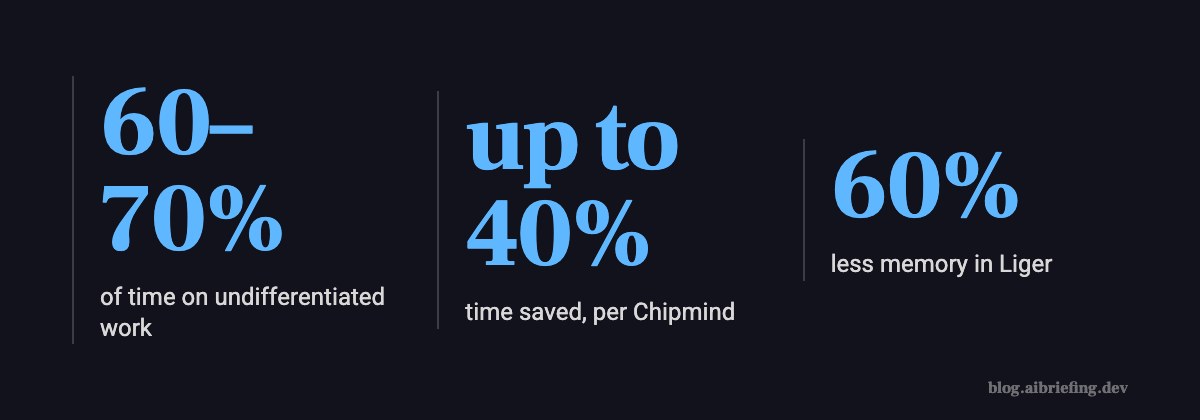
Let me start with a number. Data teams spend 60 to 70 percent of their time on undifferentiated tasks. Data engineers are spending months doing upgrades.
— Shubham Mehta, AWS Analytics, re:Invent 2025 (ANT215)
Right after that he launches an agent that upgrades Spark from 2.4 to 3.5 on EMR. It’s not a chatbot and it’s not a general copilot. It’s an agent that does one upgrade, start to finish.
Two months earlier, in October 2025, Chipmind comes out of stealth with $2.5M and a post called “Accelerating chip design with AI agents”. IBM runs an event called “Accelerating complex engineering tasks with AI agents”. And on November 4, 2026, OpenAI publishes “Accelerating engineering for the physical world”. Four companies, one headline.
Where it came from, and what it isn’t
Nobody coined this. It’s not a term like context engineering, where someone wrote it down in a post and everyone quoted it after. It’s a headline that stuck, because every company selling agents has to explain to an engineering manager what they get out of it.
Roughly, accelerating engineering means taking a specific engineering workflow, one that repeats and eats expert time, and letting an agent run it in stages, with a check between each stage. The real examples so far: Spark upgrades, GPU kernels, chip verification.
What it isn’t: it’s not “give everyone Copilot and see what happens”. It’s not autocomplete. And it’s not a methodology. There’s no book, no paper, no agreed definition. If someone pitches you an “accelerating engineering framework”, ask to see the specific workflow they sped up and the before-and-after number.
What it looks like when it works: LinkedIn’s Liger Kernel
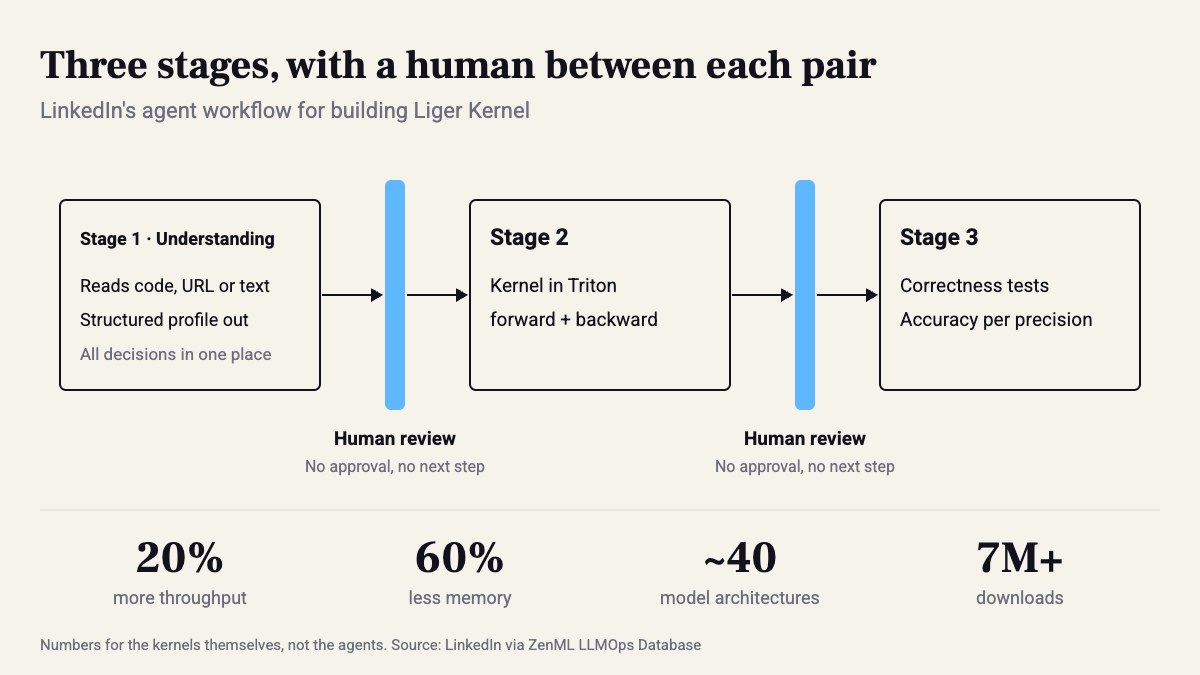
The best example right now doesn’t come from a vendor. Liger Kernel is LinkedIn’s open-source collection of GPU kernels: 20% more throughput, 60% less memory, almost 40 model architectures, over 7 million downloads and 100+ contributors. They had plenty of ideas. What they lacked was expert hours: writing forward and backward passes in Triton, writing correctness tests, checking numerical accuracy in every precision mode.
What they built: reusable agent skills that run inside AI coding agents, in a three-stage pipeline with human review between each stage. The first stage is called Understanding. The agent reads the input (code, a URL, or a free-text description) and produces a structured profile with every decision in it. A human approves the profile. Only then does it move on.
What makes this work isn’t the model. It’s the artifact in the middle. A structured profile is something a person can read in a few minutes and say “no, that doesn’t map to this component”. Fixing a decision in stage 1 costs almost nothing. Fixing it after the kernel is written and the tests fail costs a full round.

An example with numbers: Spark 2.4 to 3.5
The AWS agent for EMR does the same thing on a different problem: planning, code changes, build, and finally data quality checks. Four stages, and the last one is a check, not writing. Anyone who has done a major Spark upgrade knows the code is the easy part. The hard part is proving the tables come out the same.
The same session also showed SageMaker Data Agent. In the demo it built a customer lifetime value model with linear regression and reached an R² of 81%: SQL, visualization, one-hot encoding, and a notebook with 320 preinstalled packages. Both agents connect to the IDE over MCP.
The 81% from the demo isn’t the point, though. The point is that the agent with the narrow job (the upgrade) is the one that’s easy to evaluate. There’s an input, an output, and a data quality diff. A “general data” agent is much harder to check, so it’s much harder to say whether it sped anything up.

How to do it on your team
First, pick one workflow. The criteria: it repeats at least once a month, it has clear inputs and outputs, and there’s an automated way to check the result is correct (tests, a schema, a diff on data). A version upgrade, an API migration, adding an endpoint from a template: good candidates. “Improve performance”: not one.
Second, write it as a skill, not a prompt pasted into chat. LinkedIn packaged their workflows as skills any coding agent can invoke. In Claude Code that’s a single file:
---name: dep-upgradedescription: Upgrade one dependency across the repo in three gated stages. Use when asked to bump a major version.---
## Stage 1 — Understand (STOP after this)- Read the changelog / migration guide for the target version.- List every call site that breaks, with file:line.- Write `upgrade-profile.md`: breaking changes, affected files, risky spots, test plan.- Do NOT edit code. Ask the human to approve the profile.
## Stage 2 — Change (only after approval)- Apply changes file by file, following the approved profile only.- Anything not in the profile: stop and ask.
## Stage 3 — Verify- Run the full test suite and the build. Paste the exact commands and their output.- Compare outputs on a fixed sample (row counts, checksums, golden files).- Report what passed and what you could not verify. No success claim without output.
In practice, the most important gate is between stage 1 and stage 2. The agent doesn’t touch code until a human has read the profile. And if the profile runs longer than two screens, shorten the template. A review that takes longer than the work itself defeats the whole point.
When it isn’t worth it
Chipmind talks about cutting time-to-market by “up to 40%”. The words “up to” are doing a lot of work there. AWS talks about 60–70% of time going to work that doesn’t differentiate you. That’s a number that justifies a product, not a number that promises the agent will give it back to you.
Don’t start when:
- The workflow happens twice a year, and differently each time.
- There are no tests, or no way to validate the output without reading it line by line.
- The knowledge lives in one person’s head and they can’t write it down as a profile. Get the knowledge out first, then build the agent.
Caveat: every number here comes from the companies themselves, about their own workflows. Liger’s 20% and 60% describe the kernels, not the agents. In the public write-up I couldn’t find a number for how much time the agents actually saved, and I’d be glad to see one.
What to try this week
- Open the quarter’s PR history and look for the workflow that came back most often with the same shape.
- Measure how long it took last time. One number, in hours.
- Copy the SKILL.md above and replace stage 3 with a check that actually exists in your repo.
- Run it once and stop after stage 1. If the profile isn’t useful, the problem isn’t the model. The workflow just isn’t defined well enough for an agent.
And if you can’t write stage 3, you don’t have anything to accelerate yet.
Sources
- Accelerating Engineering for the Physical World · 2026-11-04
- Accelerating complex engineering tasks with the AI agents - IBM Developer
- AWS re:Invent 2025 - Accelerating data engineering with AI Agents for AWS Analytics (ANT215) - DEV Community
- Accelerating chip design with AI agents - Build in Digital
- LinkedIn: AI Agents Accelerating GPU Kernel Engineering for LLM Infrastructure - ZenML LLMOps Database
How this was made: drafted by our agent from 5 sources, edited and approved by Koby Almog.